
Appearance
Products & Services
The Products page is your main catalog — add items, set prices and stock, toggle active/inactive status, and link products to invoices, orders, and your storefront.
In Beentara:
- Product list: Products → Products / Services (
/products) - Create: Add Products button (bottom) → Simple, Variable, or Grouped product
- Edit: Pencil icon on a row → type-specific edit page
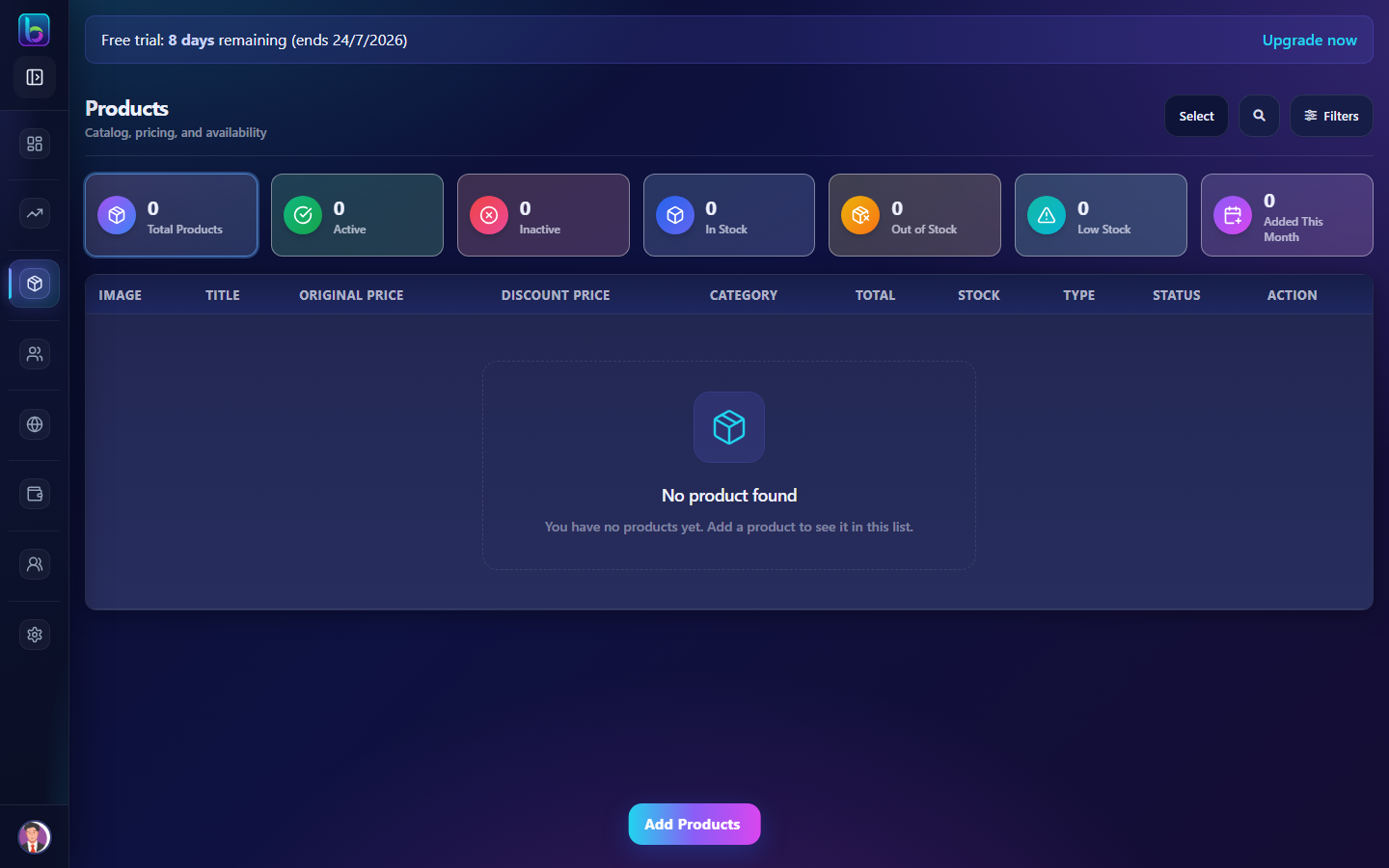 Product metrics, search, filters, table, and Add Products menu
Opening the Products page
- Open the sidebar under Products → Products / Services.
- Or go to
/products.
You need products.read permission (admins always have access).
Page layout
| Area | What it does |
|---|---|
| Product metrics | Clickable KPI cards to filter the list |
| Toolbar | Select (bulk mode), Search, Filters drawer |
| Product table / cards | Desktop table and mobile cards with actions |
| Add Products | Fixed bottom menu — Simple, Variable, Grouped |
Product metrics
Click a metric card to filter the list:
| Metric | Shows |
|---|---|
| Total Products | All products in catalog |
| Active / Inactive | Published vs hidden products |
| In Stock / Out of Stock / Low Stock | Inventory health |
| Added This Month | Recently created products |
Click again or clear filters to return to the full list.
Search and filters
- Search — title, SKU, category, type, status, prices, stock, variations
- Filters drawer — entries per page, sort (newest/oldest), date range
- Global header search also filters this page when active
Product types
| Type | Create route | Use when |
|---|---|---|
| Simple | /simple-product | Single SKU, one price and stock level |
| Variable | /variable-product | Size, color, or other variations |
| Grouped | /grouped-product | Bundle of multiple products |
| Affiliate | /external-affiliate-product | External product link (edit only from list) |
Table columns
| Column | Description |
|---|---|
| Image | Product thumbnail — click to open storefront URL if website is configured |
| Title | Product name (+ SKU for non-variable) |
| Original / Discount price | Pricing — variable products show a range |
| Category | Assigned product category |
| Total / Stock | Inventory count |
| Type | Simple, Variable, Grouped, etc. |
| Status | Active or Inactive toggle |
| Action | Edit, Delete, Duplicate |
Create a product
- Click Add Products at the bottom.
- Choose Simple, Variable, or Grouped.
- Fill in product details (name, category, pricing, images, stock, etc.).
- Save — the product appears on
/productsand can be added to invoices and orders.
Row actions
| Action | What it does |
|---|---|
| Edit | Opens the edit form for that product type |
| Delete | Removes the product (confirm dialog) |
| Duplicate | Copies the product as a new entry |
| Toggle status | Active products appear in catalog and storefront; inactive are hidden |
| Storefront link | Opens public product page when website URL is set in settings |
On mobile, tap a card to open product detail at /product-detail/:id.
Bulk delete (admin only)
- Click Select in the toolbar (admin or superadmin only).
- Check products on the page.
- Click Delete selected and confirm — active products require typing DELETE.
Related product features
| Feature | Guide | Path |
|---|---|---|
| Categories | Categories guide | /category |
| Variations | Variations guide | /features |
| Coupons | Coupons guide | /coupon |
| Catalog | Catalog guide | /catlog |
Products you create here appear in invoice line items, orders, and CMS modules that link to products.
Related guides
| Feature | Guide |
|---|---|
| Categories | How to use Categories |
| Variations | How to use Variations |
| Dashboard | How to use the Dashboard |
Sub-pages and create flows
| Flow | Path |
|---|---|
| Simple product | /simple-product |
| Variable product | /variable-product |
| Grouped product | /grouped-product |
| Product detail (mobile) | /product-detail/:id |
Configure Variations (/features) before creating variable products.
Common mistakes
| Mistake | Fix |
|---|---|
| Product hidden on storefront | Toggle status to Active |
| Variable product missing options | Add attributes at /features → Configure Terms |
| Cannot bulk delete | Only admin/superadmin see Select mode |
| Wrong category on invoice | Edit product and assign correct category |
Frequently asked questions
How do I add a product in Beentara?
Open /products, click Add Products, and choose Simple, Variable, or Grouped product.
How do I hide a product from the storefront?
Toggle the product status to Inactive on the Products list.
What is the difference between simple and variable products?
Simple has one SKU and price. Variable uses variation attributes (size, color) with different SKUs per combination.